
How to Set Up IPTV with Xtream Codes in Sparkle TV
Sparkle TV supports multiple IPTV login methods, including Xtream Codes API, which is one of the easiest and most reliable ways to access your IPTV subscription. Instead of using an M3U playlist URL, you simply enter the server information provided by your IPTV provider.
This guide explains how to configure Xtream Codes in Sparkle TV and start watching live TV in just a few minutes.
What Is Xtream Codes?
Xtream Codes is an IPTV login method that uses three pieces of information:
Server URL
Username
Password
Many IPTV providers recommend Xtream Codes because it automatically organizes channels, movies, TV series, and Electronic Program Guide (EPG) data.
Requirements
Before you begin, make sure you have:
Sparkle TV installed on your Android TV or Google TV device
An active IPTV subscription
Your Xtream Codes credentials:
Server URL
Username
Password
A stable internet connection
Step 1: Open Sparkle TV
Launch Sparkle TV on your device.
If this is your first setup, you'll be prompted to add a playlist.
If you already use Sparkle TV:
Open Settings
Select Playlists
Choose Add Playlist
Step 2: Select Xtream Codes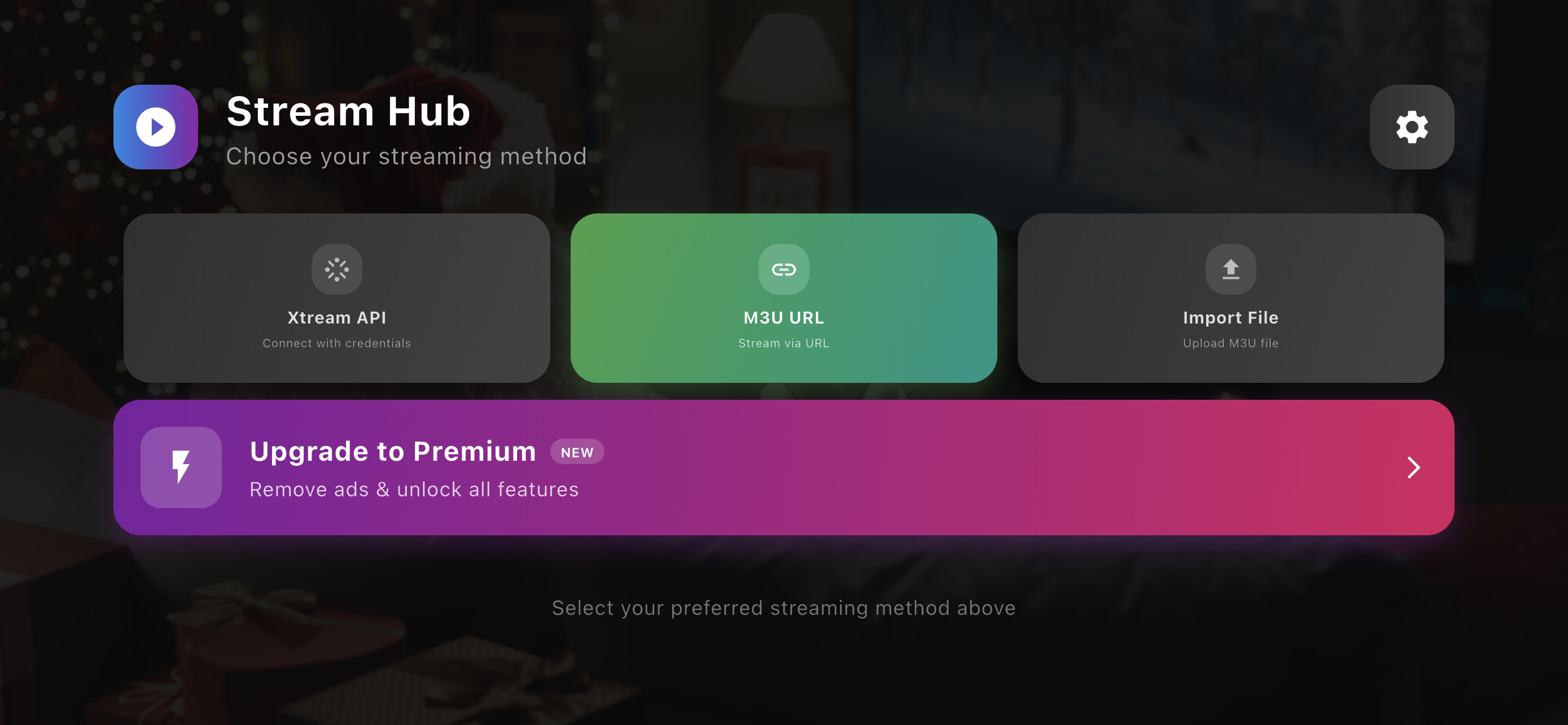
When Sparkle TV asks which playlist type you want to add, select:
Xtream Codes API
This option allows you to connect directly to your IPTV provider (RapidIPTV) using your account details.
Step 3: Enter Your Login Details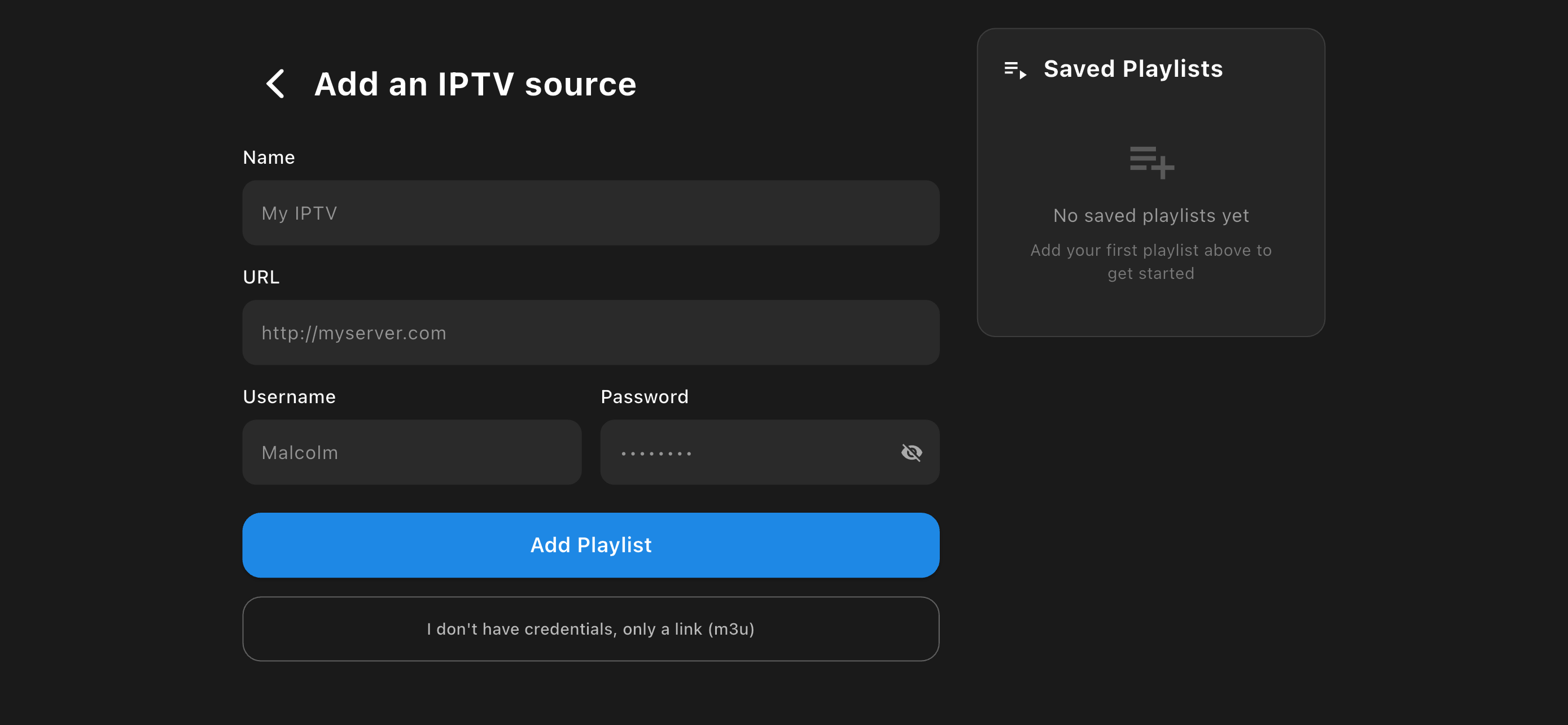
Fill in the required information exactly as provided by your IPTV provider.
Server URL
Example:
http://tv.rapidiptv.tvip.xyz
Username
Enter Rapid IPTV username.
Password
Enter Rapid IPTV password.
Check for typing mistakes before continuing.
Step 4: Connect to the Server
Select Continue or Login.
Sparkle TV will automatically:
Connect to your IPTV serve
Download available channels
Import movies and TV series (if included)
Download channel logos
Synchronize EPG information
The import process may take a minute depending on the size of your subscription.
Step 5: Browse Your IPTV Content
After synchronization is complete, you'll have access to:
Live TV channels
Movies
TV Series
Catch-up TV (if supported)
Favorites
Program Guide (EPG)
Everything is automatically categorized for easier navigation.
Troubleshooting
Login Failed
If Sparkle TV cannot connect:
Verify the Server URL.
Double-check your username and password.
Make sure your IPTV subscription is active.
Confirm that your device has internet access.
No Channels Available
If no channels appear:
Refresh the playlist.
Restart Sparkle TV.
Contact your IPTV provider to verify your account.
Missing EPG
If the TV Guide is empty:
Refresh the EPG.
Wait a few minutes after the first synchronization.
Confirm your provider supports EPG data.
Buffering Issues
Playback interruptions may be caused by:
Slow internet connection
Busy IPTV servers
Network congestion
VPN or DNS configuration
For the best experience, use a fast and stable internet connection.
Why Use Xtream Codes Instead of an M3U Playlist?
Using Xtream Codes offers several advantages:
Faster setup
Automatic channel updates
Built-in EPG synchronization
Better organization of Live TV, Movies, and Series
Simplified account management
For many users, Xtream Codes provides a smoother experience than manually importing an M3U playlist.
Frequently Asked Questions
Does Sparkle TV support Xtream Codes?
Yes. Sparkle TV supports Xtream Codes API alongside M3U playlists.
Which is better: M3U or Xtream Codes?
Both methods work well. Xtream Codes is often easier to manage because updates and EPG information are handled automatically by the server.
Can I use multiple IPTV accounts?
Yes. Sparkle TV allows you to add and manage multiple IPTV playlists or Xtream Codes accounts.
Why is my account rejected?
This usually happens because of an incorrect Server URL, username, password, or an expired IPTV subscription.
Final Thoughts
Setting up IPTV with Xtream Codes in Sparkle TV is one of the fastest ways to start streaming. Simply enter your server information, let Sparkle TV synchronize your content, and you'll be ready to enjoy live TV, movies, and series with an organized interface and built-in EPG support.
If you run into any issues, verify your login credentials and internet connection before contacting us (Rapid IPTV provider).